Types of Web Hosting Explained: Shared, VPS, Dedicated, and Cloud Compared (2026)
If you're launching a website for the first time, the number of hosting options out there can feel overwhelming. Shared hosting, VPS, dedicated servers, cloud hosting… what do all these words even mean? And which one is right for you*?*
The good news is that despite all the marketing jargon, most hosting products fall into just four main categories. Once you understand how each one works, picking the right one becomes straightforward.
This guide breaks down all four major types of hosting — how they work, what they're good at, what they cost, and who should (and shouldn't) use them.
The Big Picture: A Quick Analogy
Before we dive into technical details, here's a simple way to think about each type of hosting. Imagine you're looking for a place to live:
- 🏠 Shared hosting = a dorm room. Cheap, you share everything with roommates, but you have very little space or privacy.
- 🏢 VPS = an apartment in a building. You share the building with others, but you have your own private unit with a front door, kitchen, and bathroom.
- 🏡 Dedicated server = a whole house. It's entirely yours — you can do whatever you want with it, but it's expensive and you have to maintain it yourself.
- ☁️ Cloud hosting = a luxury hotel. You can have one room or a hundred rooms, they change instantly depending on how many you need, and everything is taken care of for you.
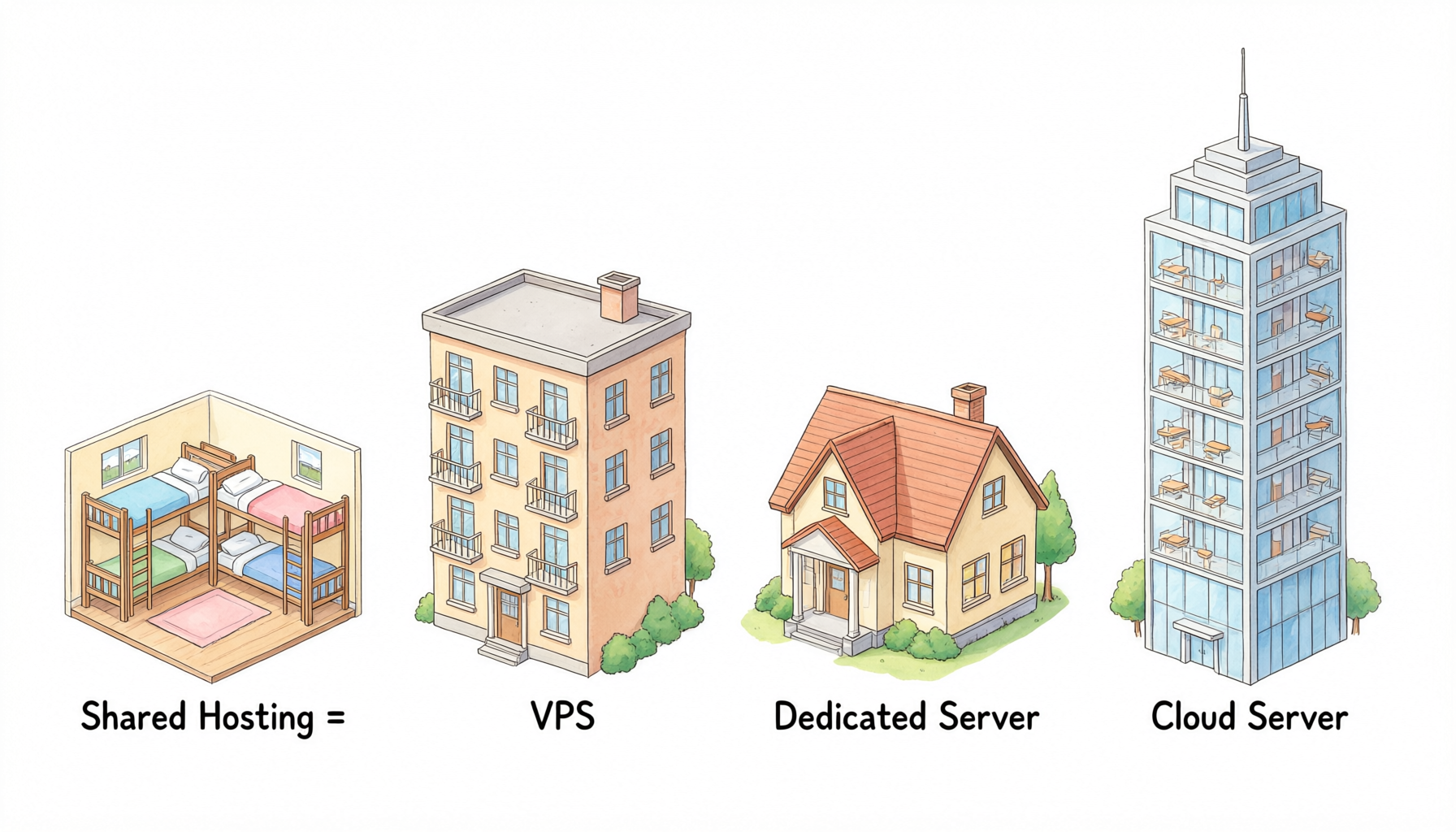
Keep that analogy in mind as we go through each one in detail.
1. Shared Hosting — The Entry-Level Option
How It Works
Shared hosting is the most basic — and cheapest — type of hosting. A single physical server is split up among hundreds (sometimes thousands) of individual websites. Everyone shares the CPU, RAM, disk space, and bandwidth.
You get a chunk of storage space and a control panel (usually cPanel or something similar) to upload your files and manage your email. That's about it. You can't install custom software, you can't change server settings, and you have no idea who you're sharing the server with.
Pros of Shared Hosting
- 💰 Extremely cheap — often 2–10 per month;
- 🧹 No maintenance required — the host handles all server administration, security updates, and backups;
- 🧑🎓 Beginner-friendly — cPanel makes it easy to manage email, domains, and website files without technical knowledge;
- 🚀 Instant setup — you can have a website up and running in minutes.
Cons of Shared Hosting
- 📉 Inconsistent performance — if another site on your server gets a traffic spike, your site slows down;
- 🔒 Very limited control — you can't install custom software, choose a different PHP version, or modify server settings;
- 🛡️ Security concerns — a vulnerability on one site could potentially be used to compromise others on the same server;
- 📈 Easy to outgrow — once your site gets any real traffic, you'll quickly hit the limits.
Who Should Use Shared Hosting?
Shared hosting is perfect for:
- Personal blogs and hobby sites;
- Small business "brochure" websites that get very little traffic;
- People building their very first website;
- Anyone on an extremely tight budget.
Who Should Not Use Shared Hosting?
Skip shared hosting if:
- You're running an e-commerce site or any revenue-generating business;
- You need consistent, reliable performance;
- You want to install custom software or frameworks;
- You care about advanced security and isolation.
2. VPS (Virtual Private Server) — The Sweet Spot
How It Works
VPS stands for Virtual Private Server. It's a step up from shared hosting and sits between shared and dedicated servers in both price and features.
Using virtualization technology (like KVM, Xen, or Hyper-V), a single physical server is divided into multiple virtual servers. Each VPS gets its own guaranteed allocation of CPU cores, RAM, disk space, and bandwidth. You get full root / administrator access, you can install any compatible operating system, and your resources are completely isolated from other users on the same physical machine.
It's like having your own private server — virtually.
What Can You Do With a VPS?
Pretty much anything you could do with a dedicated server, just on a smaller scale:
- Host websites, web apps, and databases;
- Run game servers (Minecraft, CS:GO, etc.);
- Set up VPNs, email servers, or private cloud storage;
- Host development environments and test platforms;
- Run custom software and services.
Pros of VPS Hosting
- ✅ Guaranteed resources — what you pay for is what you get, no "noisy neighbor" problems (at least with reputable hosts);
- 🔓 Full root access — install whatever software you want, configure however you like;
- 💰 Great value — way cheaper than a dedicated server, way more powerful than shared hosting;
- 📈 Scalable — upgrade CPU, RAM, and storage in minutes;
- 🛡️ Better security — your environment is isolated from other users.
Cons of VPS Hosting
- 🧑💻 Requires technical knowledge — you're responsible for managing the server, installing updates, fixing things when they break (unless you get managed VPS);
- 💸 More expensive than shared — typically 10–100/month for mid-range plans;
- ⚖️ Still limited by the physical server — you can't scale beyond the resources of the host machine.
Who Should Use VPS?
VPS is the best choice for:
- Growing websites and blogs with steady traffic;
- Small businesses and e-commerce sites;
- Developers and tinkerers who want full control;
- Anyone who has outgrown shared hosting;
- People running custom applications, game servers, or other services.
Managed vs. Unmanaged VPS
One important distinction: VPS comes in two flavors.
- Unmanaged VPS — cheaper, but you're on your own. You get root access and a bare OS; everything else is up to you. Best for people with sysadmin skills.
- Managed VPS — more expensive (usually 30–50% more), but the host takes care of security updates, backups, monitoring, and basic troubleshooting. Best for busy people who want VPS power without the work.
3. Dedicated Server — Maximum Power, Maximum Price
How It Works
A dedicated server is exactly what it sounds like: you rent an entire physical server, all to yourself. No sharing, no virtualization, no limits imposed by other users.
The whole machine's CPU, RAM, disk drives, network ports — everything is yours. You can configure it however you want, install any OS, run any software, and push it to its full capacity.
Pros of Dedicated Servers
- ⚡ Maximum performance — 100% of the server's resources are yours, all the time;
- 🔒 Highest security — no other tenants means no risk from neighboring sites;
- 🎛️ Complete control — you choose every component, from the CPU to the hard drives to the OS;
- 🌐 Premium network — dedicated servers usually come with better network connectivity and higher bandwidth allocations;
- 📊 Predictable costs — fixed monthly price, no surprise overage charges (usually).
Cons of Dedicated Servers
- 💸 Expensive — typically 80–500+ per month, depending on specs;
- 👷 High maintenance burden — you're responsible for everything (unless you pay extra for management);
- ⏰ Longer setup time — provisioning can take hours or even days (vs. minutes for VPS);
- 📉 Waste if underutilized — if you don't need all that power, you're wasting money;
- 🔧 Hardware failures are your problem — if a drive dies, you have to deal with downtime while it gets replaced (good hosts handle this quickly, but it still happens).
Who Should Use Dedicated Servers?
Dedicated servers are best for:
- Medium to large businesses with high-traffic websites;
- Companies with strict security and compliance requirements;
- Applications that need consistent, maximum performance;
- Game servers, streaming platforms, and other resource-heavy services;
- Organizations that need full control over every aspect of their infrastructure.
Who Should Not Use Dedicated Servers?
Skip dedicated servers if:
- You're just starting out or have a small site;
- You don't have the technical skills (or budget) to manage a server;
- Your traffic fluctuates a lot (cloud hosting is probably better);
- You're not sure you actually need that much power.
4. Cloud Hosting — The Modern, Flexible Option
How It Works
Cloud hosting is the newest kid on the block, and it works very differently from the other three.
Instead of running on a single physical server, cloud hosting uses a cluster or network of connected servers. Your website or application lives on this "cloud" of machines, and resources can be dynamically allocated based on what you need.
If one physical server fails, your site automatically shifts to another one in the cluster. If you get a sudden traffic spike, the cloud instantly adds more resources to handle it. You only pay for what you actually use.
Think of it like electricity: you don't have your own personal power plant; you plug into the grid and pay for whatever you consume that month.
Pros of Cloud Hosting
- 📈 Virtually unlimited scalability — scale up or down instantly based on traffic;
- 💵 Pay-as-you-go pricing — only pay for the resources you actually use;
- 🛡️ High availability — if one server goes down, your site keeps running on another one;
- 🌍 Global infrastructure — deploy your site in multiple regions around the world;
- 🔧 No hardware worries — the cloud provider handles all the physical maintenance.
Cons of Cloud Hosting
- 💸 Costs can spiral — if you're not careful with usage, the bill can be surprisingly high;
- 🧩 More complex to set up and manage — cloud platforms (AWS, GCP, Azure) have steep learning curves;
- 🔐 Less control over hardware — you can't pick specific CPU models or customize every detail;
- 📋 Pricing is confusing — with so many services and add-ons, it's hard to predict what you'll actually pay.
Who Should Use Cloud Hosting?
Cloud hosting is ideal for:
- Websites with highly variable or unpredictable traffic;
- Fast-growing startups and businesses that need to scale quickly;
- Apps that need to be deployed across multiple geographic regions;
- Companies that want to pay only for what they use;
- Development teams that need flexibility and rapid deployment.
Head-to-Head Comparison Table
Here's everything in one easy-to-scan table:
| Feature | Shared Hosting | VPS | Dedicated Server | Cloud Hosting |
|---|---|---|---|---|
| Cost (typical) | 2–15/mo | 10–100/mo | 80–500+/mo | $10–unlimited/mo |
| Resource allocation | Shared with hundreds | Guaranteed, dedicated | 100% dedicated | Dynamic, elastic |
| Root / admin access | ❌ No | ✅ Yes | ✅ Yes | ✅ Yes |
| Custom software | ❌ No | ✅ Yes | ✅ Yes | ✅ Yes |
| Performance | Inconsistent | Predictable | Maximum | Variable, scalable |
| Security isolation | Weak | Strong | Very strong | Very strong |
| Scalability | Very limited | Good (upgradeable) | Poor (hardware limits) | Excellent (instant) |
| Technical skill needed | Very low | Medium | High | High |
| Best for | Beginners, hobby sites | Growing sites, small business | Enterprise, high-traffic | Variable traffic, startups |
Which Type of Hosting Is Right for You?
Still not sure? Here's a simple decision tree:
-
Are you launching your very first website, a personal blog, or a tiny hobby site?
→ Shared hosting is probably fine. Start cheap and upgrade later. -
Is your website for a business, or does it generate revenue?
→ Go with VPS at minimum. The extra cost is worth it for reliability and control. -
Do you have steady, high traffic (100k+ visitors/month) and strict performance needs?
→ Consider a dedicated server. -
Does your traffic spike unpredictably, or do you need to scale up and down quickly?
→ Cloud hosting is your best bet.
🎯 Rule of thumb: Start with the cheapest option that meets your needs, then upgrade when you outgrow it. You don't need a dedicated server on day one — but you do want to be with a host that makes upgrading easy.
Common Misconceptions
Myth: "More expensive = better"
Not always. A $300 dedicated server is overkill for a 1,000-visitor-per-month blog. Pick the tier that matches your actual needs, not the one with the most impressive specs.
Myth: "VPS is always faster than shared hosting"
It depends on the provider. A well-run shared host on NVMe servers can be faster than a cheap, oversold VPS with old hardware. The quality of the provider matters more than the hosting type.
Myth: "Cloud hosting is always the best"
Cloud is amazing for certain use cases, but it's also the most complex and potentially the most expensive. For a stable, predictable workload, a good VPS or dedicated server is often simpler and cheaper.
Myth: "Once you pick a type, you're stuck"
Nonsense. You can start on shared hosting, move to VPS when you outgrow it, move to dedicated when you really need it, and move to the cloud if you need global scale. Most providers make migration straightforward.
Final Thoughts
At the end of the day, all four types of hosting have their place. There's no universally "best" option — only the best option for your specific situation.
- Shared hosting is cheap and simple, but limited.
- VPS offers the best balance of price, power, and flexibility for most people.
- Dedicated servers give you maximum performance and control, at a premium price.
- Cloud hosting is the most flexible and scalable, but also the most complex.
My advice? Start small, grow with your site. Launch on shared or entry-level VPS, focus on building your content and audience, and upgrade your hosting only when you genuinely need to. That way, you never waste money on power you don't need.
💻 Looking for reliable VPS hosting that grows with you?
sixcvm offers high-performance KVM VPS with plans for every stage — from entry-level starter sites to resource-heavy business applications.
- ⚡ All-NVMe SSD storage — blazing fast disk I/O;
- 🛡️ Free 20Gbps DDoS protection — included with every plan;
- 🌐 Optimized global routes — low latency from Asia, North America, and Europe;
- 🔓 Full root access — install anything you want;
- 📈 Instant upgrades — scale up CPU, RAM, and storage in minutes;
- 👨💻 24/7 technical support — help is always available when you need it;
- 💰 3-day money-back guarantee — try it risk-free.