How Do DDoS, CC Attacks and ARP Spoofing Actually Take Down a Server — and How Do You Defend Against Each?
Network attacks are not some exotic black art. They happen constantly, and the barrier to entry is far lower than most people assume. Rather than studying how to attack someone, it pays far more to understand how the common techniques work — once you know what the attacker is consuming, you know exactly what you need to protect.
The short answer: nearly every server attack drains one of three things — bandwidth, resources, or trust. DDoS mainly fights over bandwidth and connection slots, CC attacks target application-layer processing power, and ARP spoofing forges identity to steal data directly. Defense therefore comes down to three checkpoints: ingress filtering, distributed offloading, and anomaly scrubbing.
One thing needs to be said up front: launching tests or attacks against servers you do not own is illegal. Everything below is written for recognizing attack patterns and hardening your own systems.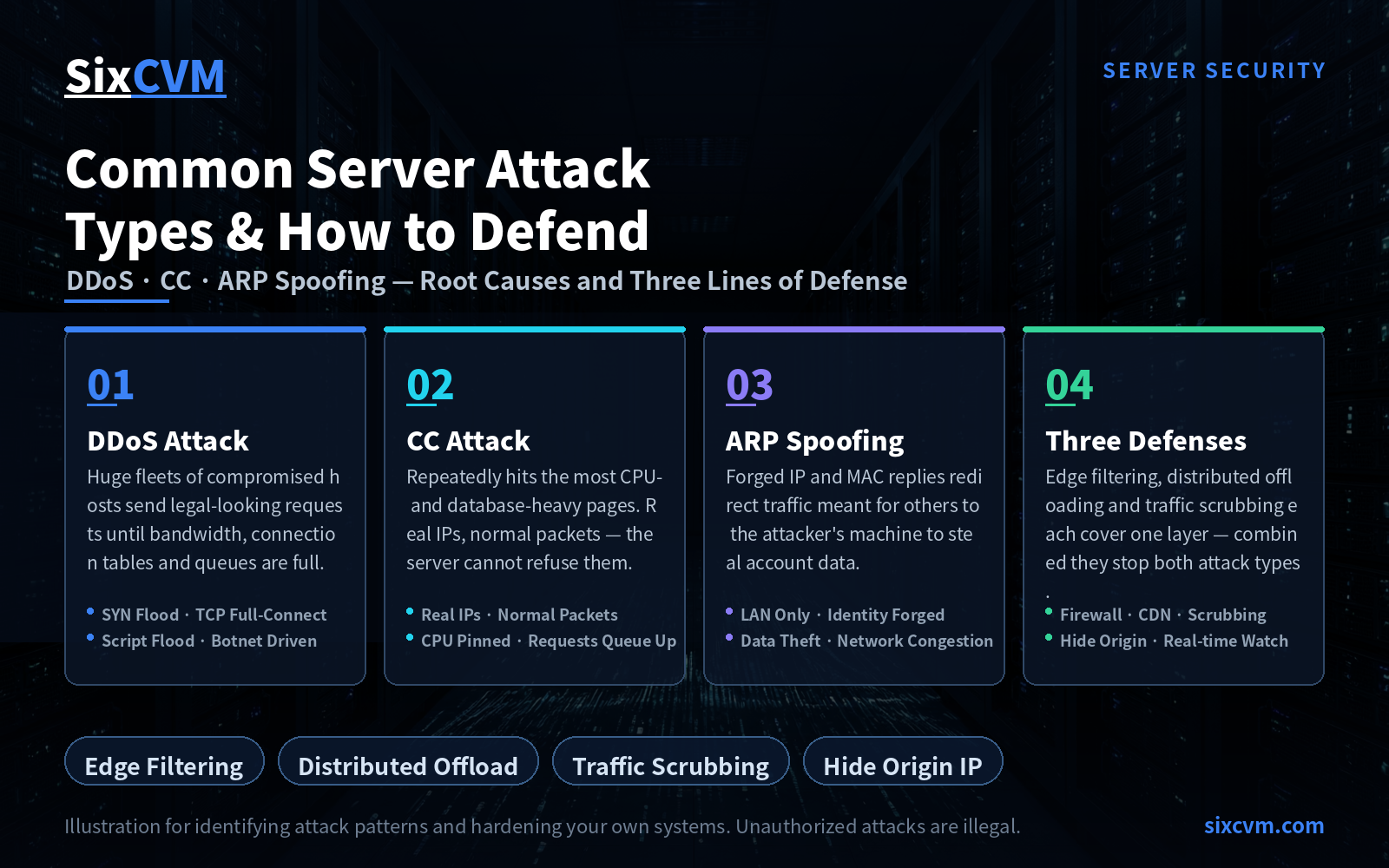
1. DDoS: flooding the service until it collapses
DDoS is the oldest and most widespread category of network attack, and most other variants descend from it. They share one playbook: take control of a large number of compromised machines (botnet nodes) and have them all send requests that look perfectly legitimate, filling up bandwidth, connection tables or processing queues until real users can no longer get in.
Here are the three most representative implementations.
1.1 SYN Flood: start the handshake, never finish it
SYN Flood exploits a built-in weakness in the TCP three-way handshake. Normally the client sends SYN, the server replies SYN-ACK and reserves a small amount of state waiting for confirmation, and the client completes with ACK.
The attacker performs only the first two steps: it fires off a large volume of SYN requests with spoofed source addresses and never answers the SYN-ACK. For every SYN it receives, the server has to hold a half-open connection waiting for a confirmation that will never arrive. Once the waiting queue fills up, genuine users' connection requests can no longer get through. The machine itself is not broken — its resources were simply occupied by people holding places in line.
What to look for: a large number of connections in SYN_RECV state in netstat or ss; source IPs highly scattered and unreachable on callback.
1.2 TCP full-connection attack: draining the connection quota
This one is more blunt — the compromised hosts fully establish TCP connections with the target rather than stopping halfway as in a SYN Flood. Every machine has a ceiling on concurrent connections; the connection table, memory and file descriptors are all finite. When a huge number of real connections are held open at once, the server runs out of resources and can no longer answer new requests.
It has two distinctive traits: it slips past many traditional firewalls (because the connections are "complete and legitimate"), and it is comparatively easy to trace back (because the real IPs of the botnet nodes appear in the connection records). That is why these attacks usually depend on very large botnets — the cost and exposure risk are both higher.
What to look for: ESTABLISHED connection counts ballooning and refusing to fall; abnormally high connection counts from a single IP or a small set of subnets.
1.3 Script flood: aiming at the expensive database work
This category targets dynamic script programs such as ASP, JSP, PHP and CGI. The attacker does not need malformed packets at all — it first opens a normal connection, then keeps submitting the requests that cost the database the most, such as list queries with complex conditions, fuzzy searches, or paging all the way to the end.
The cleverness is that these requests are the site's own normal features, so a firewall struggles to judge them as illegitimate. What actually gets drained is database query capacity: connection counts look normal while CPU stays pinned and pages get slower and slower.
What to look for: a spike in slow queries; an endpoint whose QPS is wildly out of proportion to its CPU usage; identical parameters submitted at high frequency.
2. CC attacks: legitimate requests, slowly draining you dry
A CC attack is essentially sustained application-layer harassment. The attacker controls many botnet nodes and repeatedly visits the pages that require heavy computation or database interaction — search pages, login pages and dynamic listing pages are the classic targets. Individually every request is completely normal; collectively they keep the CPU pinned at full load.
It is hard to deal with because three things are true at once: the IPs are real, the packets are correctly formed, and the request parameters are valid. The server has no protocol-level grounds to refuse them and can only process them one by one, so the queue stretches longer and longer until ordinary visitors are timed out.
What to look for: CPU pinned for extended periods while bandwidth stays unremarkable; requests concentrated on a handful of expensive URLs; access logs showing highly regular intervals from the same batch of IPs.
3. ARP spoofing: forge an identity, steal the data
ARP spoofing is not about knocking the service down — it is about stealing accounts and data. It exploits ARP's built-in assumption that replies are trusted and never verified: the attacker continuously broadcasts forged ARP replies inside the local network claiming "this IP maps to my MAC address," so traffic originally destined for the gateway or a colleague's machine gets quietly redirected to the attacker.
A side effect is that it usually comes with a flood of ARP broadcasts that also slows down the whole local network, making it both a data-leak risk and an availability problem.
What to look for: MAC address changes on the same IP; duplicate or conflicting entries in the ARP table; unexpected intermediary devices appearing on the LAN.
4. Three lines of defense, from ingress to scrubbing
The defensive approach maps directly onto the three things attackers consume.
|
Line of defense |
Where it sits |
What it blocks |
|---|---|---|
|
Firewall |
Network ingress |
Filters malformed packets and illegitimate connections, absorbing a significant share of DDoS traffic. Comes in gateway and router-based variants — choose by topology |
|
CDN offloading |
Edge nodes distributed worldwide |
Spreads requests across mirror nodes so attack traffic is diluted across many points and the origin barely feels the pressure |
|
Traffic scrubbing |
Purpose-built equipment and services on the provider side |
Continuously monitors inbound traffic, identifies and drops anomalous components, and passes only clean traffic through to the origin |
These are not mutually exclusive. In practice they are layered together: the CDN absorbs most volumetric attacks, scrubbing devices handle whatever leaks through, and the firewall guards the host ingress — combined with rate limiting, connection caps and page staticization at the application layer to close the loop.
5. Quick reference: attack type cheat sheet
|
Attack type |
What the attacker consumes |
Fastest effective action |
|---|---|---|
|
SYN Flood |
Half-open connection queue |
Enable SYN cookies, shorten timeouts, rate-limit ingress |
|
TCP full-connect |
Concurrent connections and memory |
Cap connections per IP, deploy scrubbing, block anomalous subnets |
|
Script flood |
Database query capacity |
Cache hot queries, rate-limit, tune indexes |
|
CC attack |
Application-layer CPU |
Cap connections, shorten timeouts, staticize, analyse suspicious IPs |
|
ARP spoofing |
Identity trust inside the LAN |
Bind IP-MAC pairs, enable dynamic ARP inspection, segment with VLANs |
6. Frequently Asked Questions
Q1: What is the difference between a DDoS attack and a CC attack?DDoS fights over bandwidth and connection counts at the network and transport layers, usually showing up as a sharp bandwidth spike. CC attacks target the application layer and typically show unremarkable bandwidth with CPU pinned at full load. The first is easy to catch with traffic monitoring; the second requires application logs and access-pattern analysis.
Q2: If I install a firewall, am I safe?A firewall filters out a portion of malformed traffic, but it cannot stop requests that are entirely legitimate (CC attacks, script floods) or large-scale attacks spread across many sources. Treat it as the first filtration layer at the ingress, not the whole defense.
Q3: Why is a CDN recommended for absorbing attacks?A CDN spreads attack traffic across a large number of edge nodes and hides your origin's real IP. When attackers cannot find a direct path to the origin, the cost of attacking rises sharply. For small and mid-sized sites it is especially cost-effective.
Q4: Does ARP spoofing only affect the local network?ARP is a local network protocol, so its direct reach is the same Layer 2 segment. But the harm is not limited to "the network went down" — intercepted data and leaked login credentials are often the more serious outcome.
Q5: Is traffic scrubbing an alternative to a CDN?No — they complement each other. The CDN dilutes traffic and hides the origin; scrubbing equipment filters inbound traffic precisely on the provider side. For high-defense scenarios the usual practice is to combine both, plus host-level rate limiting.
Q6: As a site operator, what three things matter most day to day?First, build defense in layers (CDN + scrubbing + host hardening). Second, watch access logs and traffic curves so you detect problems early. Third, keep a backup or disaster-recovery path ready to switch to quickly for critical workloads.
About SixCVM
SixCVM is a cloud server provider built for cross-border businesses and latency-sensitive applications, operating seven core nodes across Hong Kong, Japan, the United States, Korea, Singapore, Taiwan and Vietnam over CN2 GIA and BGP-optimized routes, with Hong Kong latency as low as under 10ms. Its product range covers cloud servers (VPS), GPU servers (NVIDIA A100 / H100 / RTX series), dedicated servers, bare metal servers and domain registration, all on NVMe SSD, with minute-level deployment, elastic scaling, snapshot backup and load balancing.
Against the attack types discussed above, SixCVM offers baseline network-layer protection and system hardening guidance, and supports fast rollback to a pre-incident state from snapshots — helping gaming, streaming and cross-border e-commerce workloads restore service quickly after an attack. Combined with a 99.9% SLA and 24/7 technical support, that adds another layer of protection for business continuity.
This article is intended only to help users recognize attack patterns and harden their own systems. Launching unauthorized tests or attacks against servers you do not own is illegal.