Why Do Servers Get Attacked? How Vulnerabilities, Desktop Terminals, Scripts, and Email Are Each Exploited
The more connected the internet becomes, the larger the attack surface every server carries. Many administrators assume that a breach means "the system wasn't strong enough" — but in practice the opening usually comes from five entirely different directions. Some sit inside the server itself; others are not on the server at all, but in the browser and mailbox an employee uses every day.
The short answer: A server is rarely taken down by one wall being smashed in. It happens because server-side vulnerabilities, terminal-side vulnerabilities, content risks delivered through scripts and email, and missing protective tooling appear at the same time. Close off any single link in that chain and the cost of an attack rises sharply.
Let's walk through each entry point.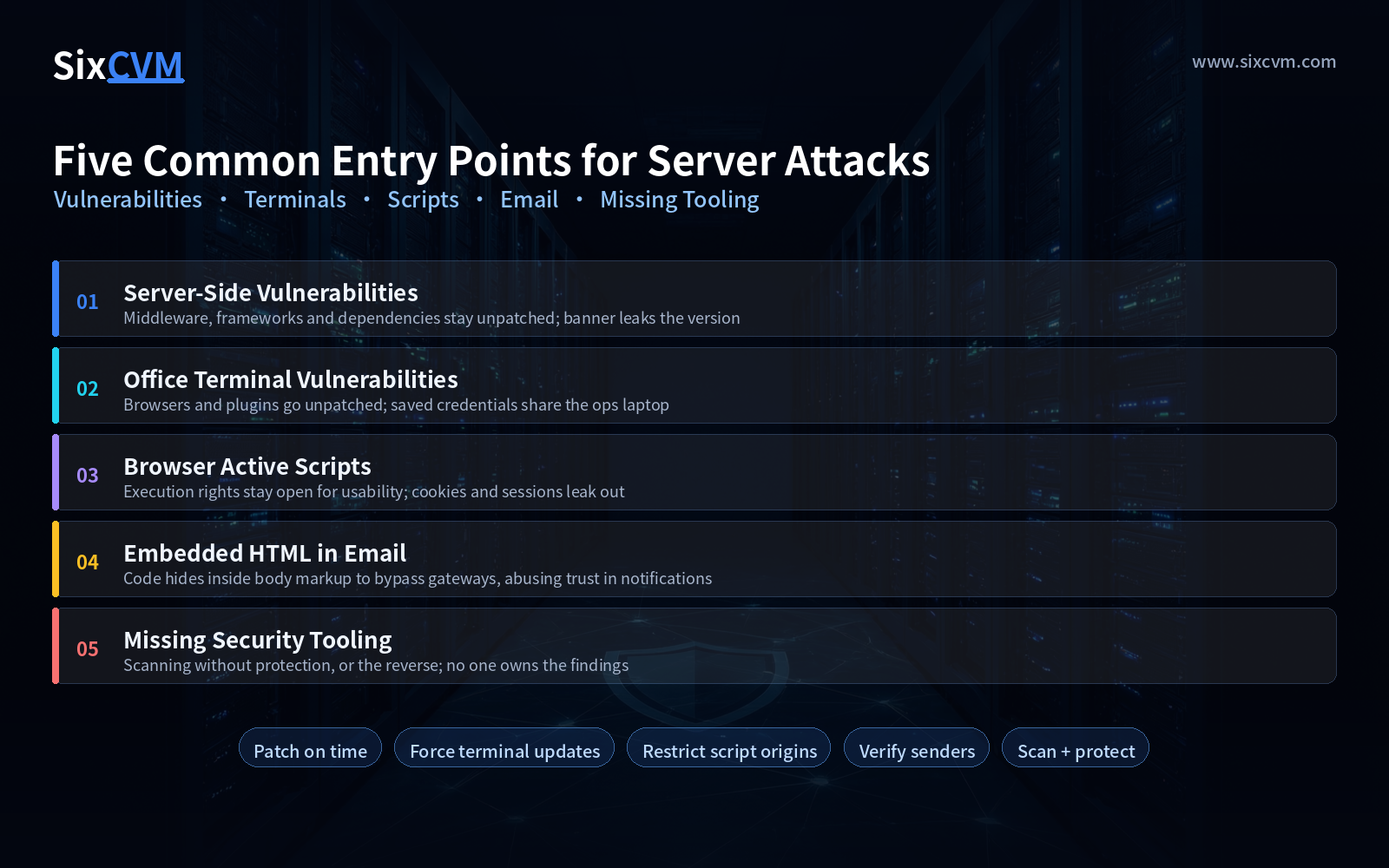
1. Vulnerabilities in the Server Itself
A server is just a machine running an operating system plus a stack of middleware. If any layer is left unpatched, you have effectively left a window unlocked. The weak spots are usually not in the kernel but in middleware, frameworks, and third-party dependency libraries — they are numerous, updated frequently, and easiest to overlook.
What makes this category painful is how late you find out: the gap between a vulnerability being disclosed and being mass-scanned for exploitation can be only a few days. If the provider does not push patches or hardening in time, tenants renting that machine get dragged down with it.
Self-check signals: component versions are more than a year old; the server banner publicly exposes its version number; administrative ports are open to the entire internet.
2. Vulnerabilities on Office Terminals (Desktops)
Many people don't realize that the easiest route into a server starts on the operations engineer's own laptop. Office machines run browsers, office suites, input methods, and various plugins — any one of them left unupdated for a long stretch can be used to deliver malicious code.
These programs have a particularly nasty trait: they can write and execute without the user clicking "allow." This is what's known as a drive-by download. The user believes they simply opened a normal web page, while malicious code is already running in the background — and from there it reaches for the credentials stored on that machine to find the server.
Self-check signals: automatic updates are disabled on office machines; the same computer is used both for reading email and for logging into the server console; credentials sit saved in the browser with no second factor.
3. Active Scripts in the Browser (Mobile Code)
JavaScript, Java Applets, .NET components, Flash, and ActiveX are the "mobile code" that executes directly inside a browser, and they are the foundation of web interactivity. In theory, blocking all of them is the safest option — but in reality, disable them and a large share of websites simply won't load or will break functionally, so almost nobody actually does it.
That contradiction is where the risk lives: permission to execute means a page can read and write cookies, fire off requests, and load external resources. Once a tampered script gets mixed into a page, or session state is crossed between pages, cookies and access privileges can be carried out.
Self-check signals: the admin panel has no restriction on script origins; cookies lack the Secure / HttpOnly flags; any third-party script can load without restriction.
4. Embedded HTML in Email
Mail gateways typically limit attachments, outbound links, and message size, so malicious senders turn their attention to the HTML body itself: hiding code inside layout markup to slip past attachment scanning, or using a perfectly normal-looking notification email to funnel the recipient to a convincing fake login page.
Email has been a persistent trouble spot because it is inherently trusted — it appears to come from a colleague, from a system notification, from a service you subscribed to. A user's mental guard is far lower than when visiting an unfamiliar website.
Self-check signals: links in the message body don't reveal their true destination; notification-style emails are never verified against the sender domain; the team has never run a phishing-recognition drill.
5. No Security Tooling Deployed
Security tools broadly fall into two categories, and many teams only deploy half of them:
|
Type |
Purpose |
Typical capabilities |
|---|---|---|
|
Scanning |
Proactively find risk |
Vulnerability scanning, configuration baseline checks, security assessment, producing a list of findings |
|
Protection |
Block attacks in progress |
Deployed at the network entrance, absorbing volumetric attacks such as DDoS, hardening servers, system inspection and remediation |
Scanning without protection is like holding a medical report while leaving the door open. Protection without scanning means you never learn what other holes you still carry.
Self-check signals: has a complete vulnerability scan ever been performed; is there network-layer protection and system hardening; when an issue is found, who owns closing the loop.
Quick Reference: Five Entry Points
|
Entry point |
Root cause |
Fastest high-impact action |
|---|---|---|
|
Server vulnerability |
Patching lags for components and middleware |
Keep a patch register and upgrade on a fixed cadence |
|
Office terminal vulnerability |
Terminals go unpatched; credentials and operations share one device |
Force automatic updates; use a dedicated device for operations |
|
Browser active scripts |
Executing permissions must stay open for usability |
Restrict script origins; add protection flags to cookies |
|
Embedded HTML in email |
The body bypasses gateway limits; trust is abused |
Block remote content in message bodies; verify through a second channel |
|
Missing security tooling |
Only scanning, or only protection |
Cover both; assign a named owner for findings |
FAQ
Is a server attack always the provider's fault?Not necessarily. Cloud environments follow a shared responsibility model: the provider owns the infrastructure and physical layer, while patches above the operating system, account credentials, and application configuration generally belong to the customer. Most incidents involve a small gap on each side being chained together.
Am I safe once every patch is applied?Beyond patches there is a second category of risk called misconfiguration — default passwords, listable directories, exposed ports. Patching addresses known defects; configuration addresses the doors you left open yourself.
What is the first thing to do when something looks wrong?Isolate and contain first, analyze the cause second: cut unnecessary external access, preserve forensic evidence, reset credentials for sensitive systems. Do it in the wrong order and you often lose both the data and the explanation.
How do I tell whether my server is already being used as a relay?Watch for unusual outbound traffic, unfamiliar processes and scheduled tasks, and abnormal login times or source regions on accounts. These signals deserve more attention than "the system feels slow."
About SixCVM
SixCVM is a global cloud server provider built for cross-border business, delivering seven core nodes across Hong Kong, Japan, the United States, Korea, Singapore, Taiwan, and Vietnam over CN2 GIA / BGP optimized routes — Hong Kong latency runs as low as under 10ms. Its product line covers cloud VPS, GPU servers (NVIDIA A100 / H100 / RTX series), dedicated servers, bare metal servers, and domain registration. Every plan ships with NVMe SSD storage, minute-level provisioning, elastic scaling up or down, snapshot backup, and load balancing, backed by a 99.9% SLA and 24/7 technical support.
On the security side, SixCVM provides baseline network-layer protection and system hardening support. Combined with snapshot backup, it lets a business roll back and recover quickly when something goes wrong — patch what needs patching on time, and prepare the way out in advance.