The Short Answer
People who ask how to prevent server attacks are usually not beginners. They have already stood up a security function, written job responsibilities, and deployed monitoring — and then hit something more frustrating: the policy is on the wall, the vulnerabilities still don't get patched, and the anomalies still don't get noticed.
In one sentence: prevention is not a document on the wall. It is an inventory you can look up at any moment, a remediation loop that closes by itself, and logs someone can actually read. A policy only takes effect once it has been translated into those three things.
The three sections below are that translation — and they are what "audit, diagnose, harden" actually looks like once it reaches the ground.
This article is about building an executable internal protection process. It involves no testing of, or attacks against, anyone else's systems.
1. First, Understand Why "The Roles Are Assigned" Still Isn't Enough
Standing up a security function, defining job responsibilities, and writing regulations are all necessary. But in real incidents, the reason for failure is rarely "nobody was responsible." It is that responsibility was written as a noun rather than a verb.
The comparison makes it obvious:
|
How it usually gets written |
What's missing |
What it should look like in practice |
|---|---|---|
|
"Responsible for server security" |
No cadence, no scope, no remediation deadline |
Verify the inventory weekly; patch critical vulnerabilities within 48 hours |
|
"Perform monitoring and management" |
No metrics, no thresholds, no responder |
Three metric groups: failed logins, CPU, outbound traffic; respond within 15 minutes |
|
"Detect and resolve issues promptly" |
No definition of "promptly" |
General issues within 24 hours; critical issues start remediation within 4 hours |
"Responsible for security" and "verify the port list every week" are entirely different things. The first cannot be checked; the second can. Only actions that can be checked actually happen.
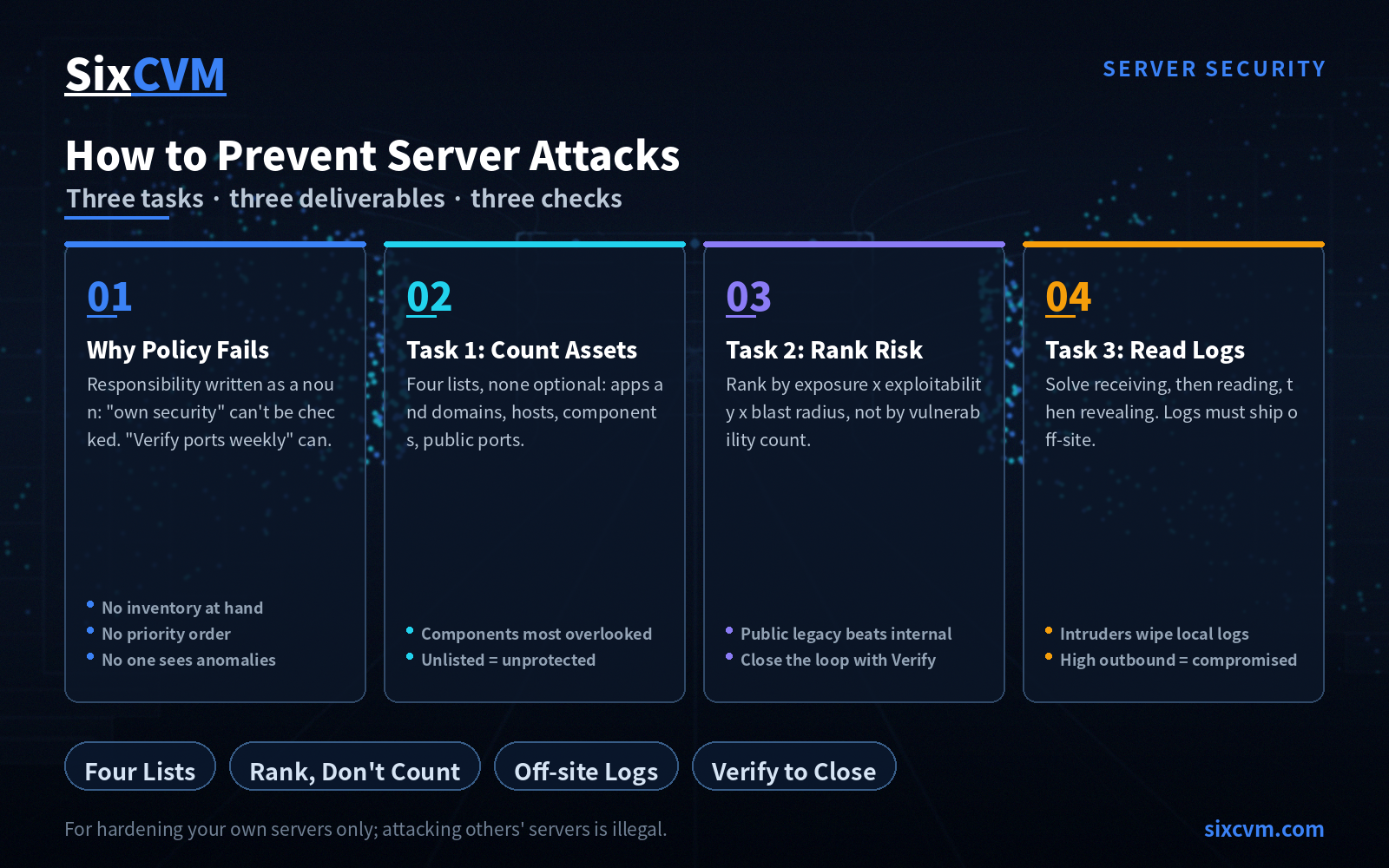
Pulling this together, prevention usually fails for exactly three reasons: the inventory isn't at hand, the priority order can't be produced, and nobody sees the anomalies. The next three sections address each one.
2. Task One: Count Your Assets and Dependencies (What "Audit" Actually Means)
"Audit everything" sounds like a slogan. In operational terms it is quite concrete — you produce an inventory you can look up at any time. Four lists are needed, and missing any one of them will distort the other two tasks:
-
Applications and domains: how many sites, how many domains, what each one does, which machine it runs on
-
Hosts and instances: how many servers, on which nodes, who manages them, when they expire
-
Components and dependencies: the most overlooked and most frequently attacked list. Operating system and kernel, web server and runtime, database, CMS plus its plugins and themes, third-party libraries — all five layers
-
Public ports and services: which ports are exposed to the internet, what service each maps to, and whether it is genuinely necessary
The value of these four lists is that they make comparison possible. With them, you can still tell what's new after adding services daily and installing plugins weekly — and in the overwhelming majority of intrusions, "the one extra thing" is exactly what gets used.
One principle to remember: an asset you cannot describe is an asset you are not protecting.
3. Task Two: Turn Risk Into an Order You Can Act On (How to "Diagnose")
"Diagnose everything" most often degenerates into two useless exercises: piling up raw vulnerability scan reports, and marking everything as critical. The real output of diagnosis is not a report — it is a sequence. What gets fixed first, what waits.
3.1 Compliance Baseline and Real Risk Are Two Different Lines
Compliance frameworks such as classified protection requirements exist to level the floor. They represent a passing grade, not a security line. You can be fully compliant and still get breached; you can be non-compliant and never have an incident. So diagnosis has to watch both lines: the compliance gap shows what isn't standardized yet, the vulnerability risk shows what would actually let someone in. The order matters — look at real risk first, then close compliance gaps.
3.2 How to Rank: Exposure × Exploitability × Blast Radius
Do not rank by vulnerability count. Rank by these three factors:
-
Exposure: is this service open to the internet? A risk reachable only from the internal network is not in the same league as one open to everyone
-
Exploitability: does it require a long chain of preconditions, or is there working tooling that makes it a scan-and-shoot target?
-
Blast radius: once inside, do you lose one machine or the entire database?
Anything that scores high on all three must be handled that day. This is also why a single internet-facing legacy component often outranks ten medium-severity findings sitting on the internal network.
3.3 Of the Four Words in the Loop, the Last One Is the One People Skip
Detect → Identify → Remediate → Verify.
Everyone does the first three. The fourth routinely goes unowned: once the patch is in, nobody goes back to confirm that it is genuinely fixed, that it was never exploited, and that there is no second path in. So the same issue resurfaces three months later.
Two actions close the loop properly:
-
Post-remediation rescan: confirm the vulnerability is actually gone, rather than that "a patch was installed"
-
Retrospective review: if the opening existed, find out whether anyone came through it during that window
4. Task Three: Read Anomalies Out of Logs (The Step Most Often Done Wrong)
The original guidance lands "harden everything" on collecting and analyzing security logs, and the direction is right — logs are the only source of leads that doesn't depend on the attacker's cooperation. But for logs to be useful, three problems have to be solved in order. Skip any of them and you are left with text that occupies disk space.
4.1 First, Make Sure You Receive Them
The first hurdle is retention. One pattern deserves particular attention: the first thing an intruder usually does after getting in is wipe the local logs. So logs cannot live only on the machine being protected — they need to be shipped off to a host the attacker cannot reach, with a retention window long enough to matter (30 days as a baseline).
At the same time, face this squarely: anything the logs never recorded cannot be proven after the fact. Key operations — account changes, logins, access to sensitive data, configuration edits — should have auditing enabled. Without it, post-incident analysis degrades into guesswork.
4.2 Then, Make Them Readable
Once volume grows, noise drowns the signal. Reducing noise does not mean deleting logs. It means discarding what doesn't matter and keeping what does:
-
Strip out repetitive healthy-state heartbeats and health-check records
-
Preserve and surface the key fields: source address, account name, request path, response status, timestamp
-
Correlate records of the same event across locations instead of leaving them scattered across dozens of files
4.3 Finally, Make Them Revealing
After noise reduction, there are surprisingly few leads worth watching — but each one is concrete:
|
What you see |
What it may mean |
What to check |
|---|---|---|
|
Many failed logins from one source in a short window |
Brute-force probing |
Whether a successful login followed; whether the source is blocked |
|
Access to many non-business paths |
Automated scanning for entry points |
Whether any of those paths actually serve reachable files |
|
Account login at an unusual hour |
Credentials may have leaked |
Whether the source address is familiar; whether new accounts appeared |
|
Outbound traffic rising abnormally |
Possibly used as a relay, for mining, or for exfiltration |
Which process, connecting where |
The last row is the most frequently ignored: high inbound traffic means someone is attacking you; high outbound traffic means you may already be compromised.
5. Putting the Three Tasks in Order
Sorted by return on effort, even a small team can work through this:
-
Build the inventory first: of the four lists, ports and components pay off fastest — you can immediately cut unnecessary external exposure
-
Then secure log retention: get "receiving" working first, with off-site shipping and 30-day retention. Extremely low cost, extremely high return
-
Then establish a patching rhythm: fix three numbers — how often you check, how fast you remediate, how you verify. This matters more than having advanced tooling
-
Then harden identity: unique admin credentials, remove default accounts, enable multi-factor authentication on admin panels and cloud consoles
-
Finally, rehearse: take snapshots on a schedule, and actually restore one periodically — a backup that has never been tested is not a backup
6. Quick Reference: The Three Tasks
|
Task |
What you deliver |
What "done" looks like |
|---|---|---|
|
Audit |
Four lists (apps/domains, hosts/instances, components/dependencies, public ports) |
Anyone can answer on the spot what a given machine runs and which ports it exposes |
|
Diagnose |
A risk-ranked remediation table |
Every row has an owner, a deadline, and a verification result |
|
Harden |
Off-site retained security logs plus a shortlist of key leads |
Any key operation can be traced to a person, a time, and a source |
7. Frequently Asked Questions
Q1: We're a small team. Do we still need a security function and formal policy?The policy doesn't need to be elaborate, but three things are mandatory: an asset inventory, one named owner (plus a backup), and a remediation deadline. The smaller the team, the more the policy should compress into those three sentences rather than copying an enterprise document structure.
Q2: There are always more vulnerabilities than we can fix. What now?That means ranking hasn't happened yet. Don't rank by count — rank by exposure × exploitability × blast radius. Once you do, you'll usually find only a handful genuinely need same-day handling and the rest can go in batches. The real risk isn't "we missed a few medium findings." It's "three critical ones have been open for two months."
Q3: We deployed a security operations platform. Are we set?The platform solves the layer of centralizing massive log volume and reducing noise — far better than a human grepping files. But it replaces neither of two things: the inventory still needs a human (the platform doesn't know how many businesses you run), and remediation decisions still need a human (the platform won't decide which finding must be fixed today).
Q4: We passed our compliance assessment. Does that mean we're secure?No. Compliance means you cleared the passing grade and can deflect some inspections and common issues. But real attacks target your specific components and configuration, which is a different matter entirely. Having passed, you still need the inventory, the patch loop, and the logs.
Q5: How long should logs be retained?At least 30 days, and they must be shipped off-site. The reason is blunt: intruders wipe local logs first, and by the time you notice an anomaly, weeks have usually passed. Once the logs have rotated away, you cannot even reconstruct how they got in.
Q6: How do I know whether this process is actually working?Run a spot check: pick any public port — can you immediately say what service it maps to and whether it's necessary? Pick any remediation record from three months ago — can you find its verification result? Pick any login event at random — can you trace its source address? If you can answer all three, the process is alive.
About SixCVM
SixCVM is a global cloud server provider built for cross-border businesses, operating six core nodes across Hong Kong, Japan, the United States, Korea, Singapore, and Vietnam connected through CN2 GIA / BGP optimized routes, with Hong Kong latency as low as under 10ms. The product line covers Cloud VPS, GPU servers (NVIDIA A100 / H100 / RTX series), dedicated servers, bare metal servers, and domain registration. Every plan runs on NVMe SSD storage and supports minute-level provisioning, elastic scaling up or down, snapshot backup, and load balancing, backed by a 99.9% SLA and 24/7 technical support.
On the operations and security side, SixCVM directly supports several of the tasks above: port convergence through security groups removes unnecessary external exposure and is the fastest win in any inventory effort; snapshot and backup capabilities mean "keeping a way back" doesn't require a separate storage plan; placing business instances in an isolated private network reduces interference between workloads on the same segment. System hardening guidance and baseline network-layer protection are included as well. For teams maintaining several nodes themselves, a base that provisions fast, rolls back cleanly, and stays stable is what lets the process above actually run.
Related: Visit the SixCVM Server Security Center for the complete guide to protecting, detecting, and responding to server attacks.