Is Your Server Being Attacked or Actually Breached? What Fingerprints SYN, CC and UDP Floods Each Leave
People searching "how to breach a server" expect a set of intrusion steps. This article contains none — scanning, testing or attacking a server you do not own is illegal, and in serious cases a criminal offence. It answers a more useful question instead: when a server starts misbehaving, how do you work backwards from the symptoms to determine which kind of flood is hitting you?
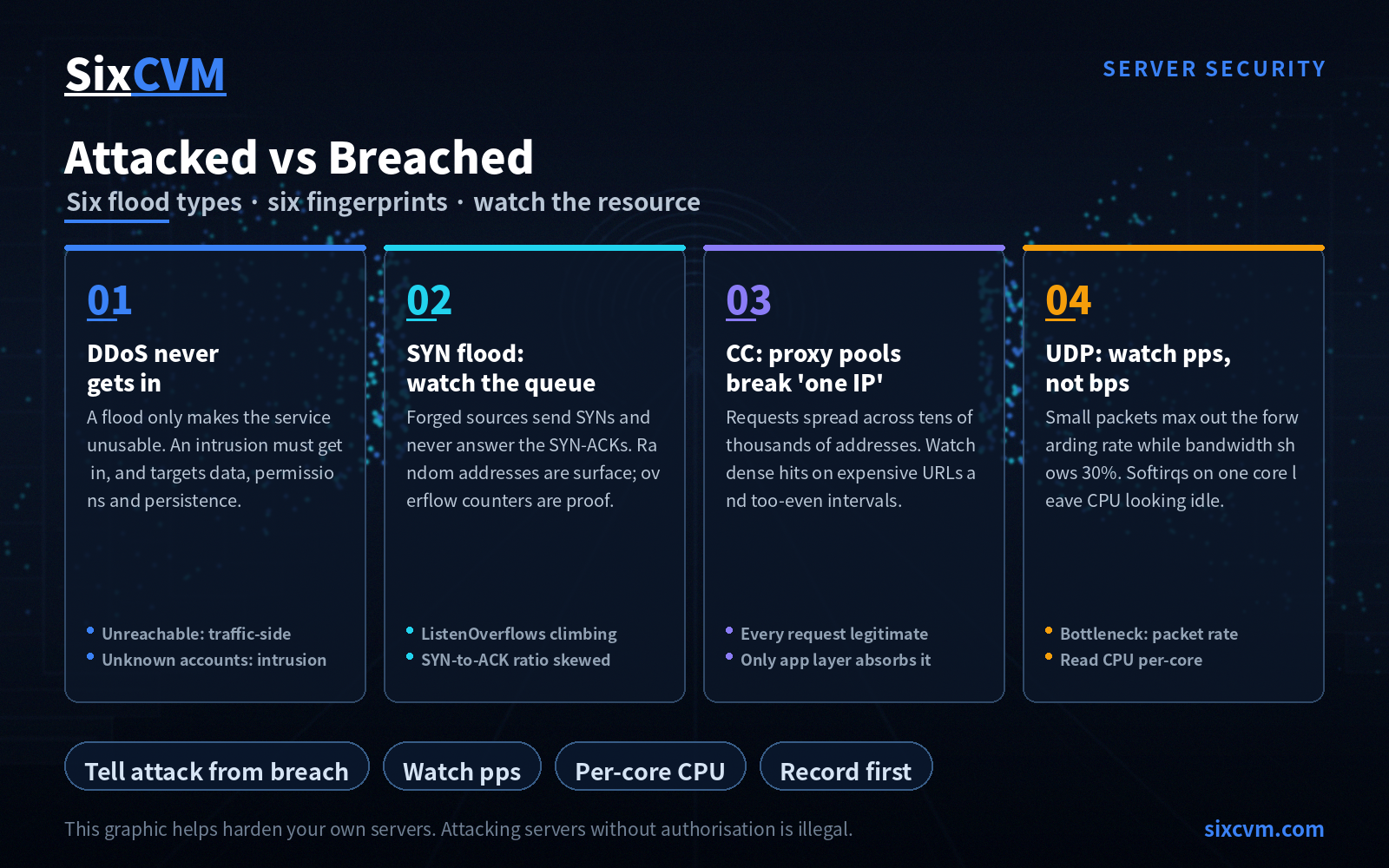
The conclusion in one line: every flood type has its own fixed fingerprint, because each consumes a different resource — SYN floods pile up half-open connections, CC burns CPU, UDP saturates the network card, ACK exhausts processing capacity. Once you know what it consumes, you know which metric to watch.
This article helps operators identify and harden their own systems. Do not use it for any unauthorised testing or attack.
1. First, a distinction: DDoS is not an intrusion — it doesn't need to get in
The source text opens by saying "the most common way servers get breached online is a DDoS attack". That sentence stacks two different things on top of each other, and they are worth separating.
DDoS is not an intrusion. It does not need your password, does not need one of your vulnerabilities, and does not need to leave anything behind on your machine — its only goal is to make your service unusable. It does not care how well your door is locked.
A real intrusion is a different line of attack: guessing or stealing credentials, exploiting a component flaw, walking in through a backdoor, then settling in, carrying data out, or using the box as a stepping stone. On this path, the attacker must actually get in.
The reason it is worth spending words on the split is that the response is completely different:
|
|
DDoS / flood |
Intrusion |
|---|---|---|
|
Does it need to enter the system |
No |
Yes |
|
Primary impact |
Service unavailable |
Data, permissions, persistence |
|
Key clues |
Abnormal traffic and connection states |
Abnormal accounts, processes, files, logs |
|
Focus of response |
Scrubbing, rate limiting, scaling |
Forensics, eradication, patching, recovery |
A useful quick test: if you cannot connect at all (timeouts, pages won't load), the problem is more likely traffic-side; if you can connect but find unfamiliar accounts or processes, that is an intrusion. Settle this layer first, then read the symptoms — it saves a lot of time.
2. SYN flood: half-open connections piling up, plus random source addresses
The criterion in the source text is accurate and can be kept as is: seeing a large number of half-open connection states on the server, especially with random source addresses, is close to conclusive for a SYN flood.
A word on why it holds. Establishing a TCP connection takes three steps: you send a SYN, the server replies with a SYN-ACK and hangs an entry in memory waiting for your final acknowledgement, and only then is the connection established. That in-between state — an entry hung up but never confirmed — is a half-open connection.
A SYN flood simply sends a huge number of SYNs with forged source addresses and never answers the server's SYN-ACKs. The half-open queue fills in moments, and new legitimate connection requests cannot even get into the queue — they are simply dropped.
"Random addresses" works because forged addresses have no pattern. Two caveats to avoid misreading it:
-
Some genuine traffic also looks dispersed (distributed scanning, crawler clusters), so "dispersed" alone is not enough
-
The harder signal is the overflow counter on the half-open queue — check whether
TcpExtListenOverflowsandTcpExtListenDropsinnstat -azkeep climbing; and whether the SYN-to-ACK ratio has skewed (send and receive are normally close; a clear bias toward SYN says a lot)
The kernel parameters that help: enable SYN Cookies (so a full queue doesn't collapse the service — it switches to stateless validation), raise tcp_max_syn_backlog, and reduce tcp_synack_retries so dead entries expire sooner. One caution: SYN Cookies are an emergency measure — they consume part of the handshake information and affect certain TCP options, so once the attack is over, reassess whether to turn them off.
3. CC: don't fixate on "same IP, high frequency"
The source says CC is an application-layer attack and can be identified from web logs: if a single IP visits many times in a short window, it is probably a CC attack.
That criterion was largely adequate a decade ago; today it only catches the crudest kind. CC tooling has long supported proxy pools: requests go out from tens of thousands of different addresses, each visiting only a handful of times — the "high frequency from one IP" signature is deliberately erased.
So what should you watch instead? A more durable set of observation points:
-
A small set of expensive URLs hit densely. Real users spread across paths; CC concentrates on the pages that query a database, compute, or render
-
Request rhythm that is too even. Real users have irregular intervals; machine-generated requests are often highly uniform
-
Unusual source-network characteristics. Large numbers of unrelated hosting ranges and cloud-provider ranges mixed together
-
Highly consistent fingerprints. The same batch of requests sharing one User-Agent, Referer, even an identical parameter combination
-
A deteriorating relationship between response time and CPU: the request count barely rose, yet every request got slower at the same time
The key distinction to remember: every one of these requests is a legitimate request on its own — complete parameters, correct format, genuine source. The protocol layer finds no reason to reject it, so only application-layer defences can absorb it: caching, rate limiting, and human verification.
4. UDP flood: watch packets per second, not bits per second
The source says "watch the network card; if it receives a large number of packets per second, be on alert". That is correct, and more important than most people realise — because it points to a routinely overlooked metric: pps (packets per second), not bps (bits per second).
The reason: an attacker can build a flood from large numbers of small packets. Total bandwidth may be only a fraction of your capacity, yet the packet-forwarding rate is already maxed out, and the NIC and kernel receive path give out first. Look back at your bandwidth graph and it only says "used 30% — why is it falling over?"
A more insidious case is uneven softirq distribution across CPU cores: receive interrupts pile onto one core while overall CPU looks idle, yet that core is saturated and already dropping packets heavily. So when you read CPU, read per-core, not just the average.
UDP has no connection and no handshake, which makes it naturally abusable. It is both a direct volumetric flood and the carrier for reflection attacks in the next section.
5. DNS and NTP: the target and the accomplice are two different roles
The source says UDP-class attacks "commonly send a large volume of traffic at DNS servers". This contains a role confusion that must be corrected:
An open DNS server plays the accomplice in reflection amplification, not the victim. Its job is to amplify traffic for you.
The mechanism: the attacker forges the victim's address and sends queries to a batch of openly reachable resolvers. Those servers dutifully send the far larger responses back to that forged origin — the real victim. The attacker hands over a small query; what lands on you is a response many times larger. Almost no bandwidth of their own, yet the traffic is multiplied dozens of times.
The same applies to the other common reflectors. Amplification factors vary widely, which is exactly why attackers shop around:
|
Reflector protocol |
Typical amplification |
Note |
|---|---|---|
|
Memcached |
Theoretically up to 10,000x |
No authentication, can return enormous payloads — dubbed "nuclear-grade" |
|
NTP (monlist) |
Up to 500x+ |
One command returns the list of clients that recently synced |
|
CLDAP |
Around 56–70x |
A newer favourite; a single host can reach scale |
|
DNS |
Around 28–54x |
The oldest classic; open resolvers are abundant |
|
SSDP |
Around 30x |
Modest per host, but the device population is enormous |
So reading the direction of DNS and NTP traffic is the key judgement:
-
Inbound heavy large packets from port 53 or 123 → you are the reflection target
-
Outbound large numbers of responses you don't recognise → your server is being used as a reflector (this must be fixed immediately too: your service has become someone's ammunition)
One piece of practical hardening while we're here: if a server offers NTP or DNS publicly with no source restriction at all, it can be conscripted as an amplifier at any time. Restricting it to the sources that actually need it is the simplest way to cut that chain.
6. A fingerprint comparison across six floods
Bringing in the remaining types named in the source. Each consumes a different resource and therefore leaves a different trace:
|
Attack type |
Layer |
Consumes |
What you see on site |
First action |
|---|---|---|---|---|
|
SYN flood |
Transport |
Half-open queue, connection table |
Many half-open states, random sources, climbing overflow counters |
Enable SYN Cookies, tune kernel |
|
CC / HTTP flood |
Application |
CPU and database cost per request |
High CPU, small legitimate requests, one URL hit densely |
Cache, rate limit, human verification |
|
UDP flood |
Transport |
Ingress bandwidth, packet-forwarding rate |
Receive pps spikes, bandwidth may not be full, possible single-core overload |
Ingress filtering, rate limiting |
|
ACK flood |
Transport |
CPU processing capacity |
Pages slow, packet loss rises, severe two-way packet imbalance |
Session-legitimacy checking |
|
ICMP flood |
Network |
Ingress bandwidth |
Heavy ping traffic, ingress saturated |
ICMP rate limiting |
|
DNS / NTP flood |
Reflection |
Ingress bandwidth (amplified dozens of times) |
Inbound large packets from ports 53 / 123 |
Scrubbing, restrict open resolvers |
Two further criteria:
What makes ACK floods distinctive is that the packets are entirely well-formed and the source can be spoofed, and they are "high frequency, low volume" — tiny packets sent at extreme rates, which slip past simple volumetric thresholds with ease. The criterion is not total volume but whether the two directions are severely imbalanced: in normal transfer the packet counts in each direction are roughly comparable; a strong skew is close to conclusive.
ICMP floods deserve a note: modern systems handle a single ICMP packet cheaply, so the real problem is the ingress bandwidth it occupies. The remedy follows naturally — rate limiting, rather than hoping the stack absorbs it.
7. Working down the evidence chain: five steps
Going from a vague "something feels wrong" to "this is exactly what it is", work in this order, because each step narrows the next:
-
Establish the nature: completely unreachable (traffic-side) or reachable but abnormal (intrusion-side)
-
See which resource is being consumed: CPU, bandwidth, connections, packet rate — which of the four hits the ceiling first
-
Look at the connection-state distribution: many half-open states points to SYN; a single address piling up established connections points to CC or a TCP flood; high receive pps points to UDP or ICMP
-
Look at direction and source ports: surging ingress means you're being hit; surging egress means you may already be a tool; the source port is itself a clue — trouble on 53 or 123 strongly suggests reflection
-
Record before you act: capture the current state first — once this data is cleared it cannot be recovered, and it determines every judgement that follows
8. Frequently asked questions
Q1: Many half-open connections with dispersed sources — is that conclusive for a SYN attack?
The direction is right, but it isn't enough. Check two harder signals: whether the half-open queue overflow counters keep climbing, and whether the SYN-to-ACK ratio is severely imbalanced. Genuine dispersed traffic (scanning, crawler clusters) also produces address dispersion.
Q2: If the logs show no "same IP, high frequency", is there no CC attack?
You can't conclude that. CC with proxy pools actively avoids that signature. Look instead at which URLs are hit densely, whether request intervals are too even, and whether fingerprints are highly consistent.
Q3: Bandwidth monitoring shows only 30% used — why can't the site load?
Two possibilities: the bottleneck is packets per second rather than bandwidth (many small packets saturating the forwarding path), or softirqs are concentrated on one core that is already saturated. When you read CPU, read per-core.
Q4: My server's outbound traffic suddenly spiked — attack or intrusion?
Outbound anomalies are usually more dangerous and more likely point to an intrusion: the box may be acting as a reflector or stepping stone, or data may be leaving. High inbound means someone is hitting you; high outbound means someone may already be inside.
Q5: In a reflection attack, am I the target or the accomplice — how do I tell?
By direction. Inbound large packets from port 53 (DNS) or 123 (NTP) — you are the target; outbound responses you don't recognise — your server is being used as an amplifier. The latter needs immediate attention too.
Q6: For a small team, which step pays off most first?
Port consolidation. Restrict publicly reachable services like DNS, NTP and SNMP to the sources that need them, and switch off what you don't use — it costs almost nothing, yet it cuts the accomplice channel outright and shrinks the surface scanners can find.
About SixCVM
SixCVM is a global cloud server provider built for cross-border business. Over CN2 GIA / BGP optimised routes it offers six core nodes — Hong Kong, Japan, the United States, South Korea, Singapore and Vietnam — with the Hong Kong node reaching latency as low as 10ms. Its portfolio covers cloud VPS, GPU servers (NVIDIA A100 / H100 / RTX series), dedicated servers, bare-metal servers and domain registration, all standard with NVMe SSD storage, minute-level provisioning, elastic scaling, snapshot backup and load balancing, backed by a 99.9% SLA and 24/7 support.
For the stages discussed above, SixCVM's relevant capabilities include: baseline network-layer protection, which filters abnormal traffic at the ingress before it reaches the workload; elastic scaling, so a saturated business can be expanded immediately — often the most direct way to stop the bleeding; snapshots, so a clean rollback after an incident needs no planning ahead; and security groups plus private network isolation, the easiest way to put port consolidation into practice and limit lateral movement between instances. For teams running nodes across several regions, a base that provisions fast, rolls back cleanly and stays stable is itself part of the defence.
Further reading: browse the full library at the SixCVM Server Security Center — protection, detection and incident response guides.