Why Are CC Attacks So Hard to Stop — and How Do You Block Them When Every Request Looks Legitimate?
Ask any operations engineer which attack they dread most, and the answer is often not a bandwidth DDoS but a CC attack. The reason is simple. A DDoS at least looks like an attack — the traffic curve spikes, bandwidth saturates in seconds, and the diagnosis needs no deliberation. A CC attack is the opposite: every request it delivers is genuine — a real source IP, a properly formed packet, a request with every parameter valid and present. Your server has no grounds to refuse it, so it processes them one by one until CPU and database connections are drained.
In one sentence: a CC attack works at the application layer and consumes your capacity to process requests, not your pipe width. The defence therefore is not about filtering traffic out, but about three things — stopping attackers from finding your origin, making every request cheap, and making anomalous sources pay a price.
This article helps operators recognise attack patterns and harden their own systems. Testing or attacking servers you do not own is illegal.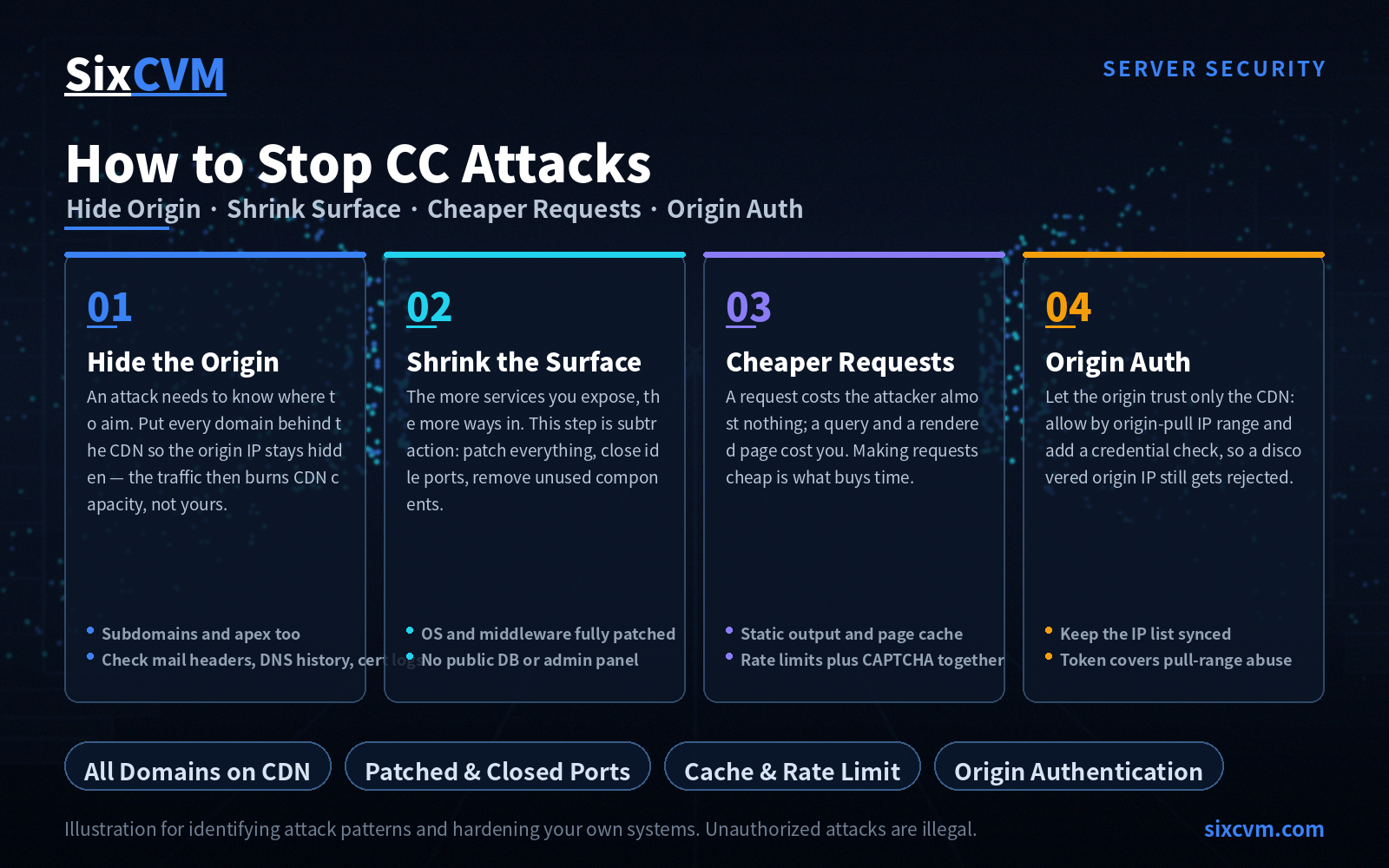
1. What Actually Separates CC From DDoS
CC is a branch of DDoS, but the two aim at different layers. A conventional bandwidth DDoS hits the network layer, aiming to clog the pipe. CC hits the application layer — layer seven — where the attacker mobilises a large pool of proxies or compromised hosts to keep requesting the resources that force your server to do real work: search endpoints, login endpoints, list pages that join several tables, checkout flows.
It has three traits that make it awkward to defend against:
-
The requests are legitimate. There is no malicious signature to match, which means even "recognising that an attack is happening" stalls at the first hurdle.
-
The sources are widely spread. Each IP sends only a handful of requests, so threshold-based IP banning misses the real attacker while risking legitimate users.
-
The cost is asymmetric. One request costs the attacker almost nothing, while your server pays for a database query and a rendered page. Correcting that asymmetry is precisely what the defence is for.
One historical note is worth keeping: the name "CC" comes from what the attack was originally designed to target — sites behind "black hole" style hardware appliances that, faced with a flood of legitimate requests, could only pass everything or block everything. It serves as a useful reminder that in the application layer, no single appliance can "intercept" the problem away; the only viable approach is layered attrition.
2. Defence Line One: Stop Attackers From Finding Your Origin
A CC attack has a precondition — it has to know where to aim. If all an attacker can see is a CDN address and your origin IP stays hidden, the traffic he generates burns the CDN's resources and money rather than your server.
The core approach: point every domain to the CDN, and let the origin accept traffic only from the CDN. Three details are commonly missed:
-
Not just the main domain. Every subdomain has to go through the CDN —
www,api,static,img, and the forgotten ones liketest,devandold. Any subdomain that resolves straight to the origin leaks the origin IP through its own DNS record. -
The apex domain too. A very common oversight is putting
wwwbehind a CDN while leaving the bare domain pointing at the origin. -
Close the other leak paths. Your origin IP can also escape through: email sent from the server itself (the real IP sits in the mail headers), historical DNS records (public history databases let anyone look them up), and TLS certificate issuance (certificate transparency logs publish the domains that were issued for). Older sites that have changed providers or IPs should check each of these.
3. Defence Line Two: Shrink the Attack Surface
Attackers have a preference order when picking an entry point: the more services you expose publicly, the easier it is to find a cheap way in. This step is about subtraction, not addition.
-
Keep patches current. Operating system, web server (Nginx / Apache), middleware, frameworks, CMS and plugins — all on a currently supported version. A good share of supposed "CC attacks" are really attackers using a known vulnerability to drop a script on the box and then drive requests through it. Once the door is forced open, traffic-layer defence becomes irrelevant.
-
Turn off what you do not use. Stop idle services, close idle ports (list them with
ss -tunlpand justify each one), and uninstall components you never use. Every extra listening port is one more thing to be probed. -
Question whether a service needs to be public at all. Databases, caches and admin panels should not be bound to a public address by default; limiting them to specific management IPs already rules out the overwhelming majority of automated scanning.
4. Defence Line Three: Make Requests Cheap
This is where optimisation skill shows, but the payoff is immediate — for the same attack intensity, lowering the cost of each request is what buys your server time.
-
Serve static whenever you can. Content and listing pages that do not vary per user should be generated as static files or cached at the CDN edge, so the request never reaches the origin.
-
Cache the dynamic pages. For pages that must query the database to render, put page or object caching in front so a cache hit returns without touching the database at all.
-
Fix slow queries. A CC attack amplifies pre-existing database problems: a 200ms slow query is tolerable under normal traffic and fatal under attack, because it exhausts the connection pool.
-
Rate-limit and cap concurrency at the application layer. Set request-rate and concurrency ceilings per IP, per session or per URI, and apply tighter thresholds to expensive endpoints such as search, login and form submission.
-
Add verification where humans and bots differ. Put CAPTCHAs or behavioural verification on login, registration, search and checkout so automated requests cannot get through the critical path.
One relationship matters here: rate limiting and CAPTCHAs must be used together. Rate limiting alone can be bypassed with a large enough pool of proxy IPs; CAPTCHAs alone will not stop high-frequency endpoints that never trigger the verification flow.
5. Defence Line Four: Let the Origin Trust Only the CDN
The usual instinct is this: since attack tools typically lock onto a specific domain, unbinding that domain on the server should make the attack "lose its target". The direction is right — the origin should refuse to recognise any request that arrives directly — but unbinding the domain alone costs too much: legitimate users are shut out along with the attackers, and the technique only applies to legacy IIS setups.
A more reliable implementation is to authenticate origin pulls, and there are two routes you can run in parallel:
-
Allow by source IP. The origin firewall permits port 80/443 only from the CDN's origin-pull IP ranges and rejects everything else. Every CDN publishes its origin-pull IP list, but that list changes — you have to keep it synced, or a CDN node rotation will break legitimate traffic.
-
Allow by origin credential. Agree a token between origin and CDN — some platforms place it in a custom request header, others use mutual TLS client certificates — and have the origin respond only when validation passes. The advantage is that even if an attacker discovers the origin IP, he does not hold a valid credential.
Running both is the safest configuration: the IP allow-list blocks the vast majority of direct hits, while the token covers the possibility of abuse from within the CDN's origin-pull ranges.
6. The Four Defence Lines at a Glance
|
Defence line |
What it blocks |
Key actions |
Watch out for |
|---|---|---|---|
|
Hide the origin |
Attackers cannot find the target |
Put every domain behind the CDN; origin never exposes its real IP |
Subdomains and apex domains are the usual leaks; check mail headers, DNS history and certificate logs |
|
Shrink the surface |
Fewer entry points to exploit |
Patch everything; close idle ports and services |
Many "CC" incidents begin with an unpatched vulnerability |
|
Cheaper requests |
The server survives longer |
Static generation, page caching, slow-query fixes, rate limits, verification |
Rate limiting and CAPTCHAs must be combined |
|
Origin authentication |
Direct-to-origin bypass |
Origin allows only CDN origin-pull ranges and credentials |
The IP list changes; sync it regularly |
7. What Order to Harden In
The four lines differ widely in cost, so proceed by return on effort:
-
Do the near-zero-cost, highest-return work first — move every subdomain and the apex domain onto the CDN and close the origin IP leak paths; deal with patches and idle ports at the same time. Neither step costs extra money, and both raise the barrier immediately.
-
Then optimise the application — caching, slow queries, rate-limit rules, CAPTCHAs. This spends time rather than money, and it improves everyday performance too, so it pays for itself either way.
-
Finally add origin authentication — IP allow-lists and credential validation at the origin. Configure once, and it keeps working; it is the backstop for when the earlier steps fail.
-
Only then decide whether volume-based scrubbing or anti-DDoS capacity is warranted, based on how much your revenue depends on uptime. This is the most expensive layer and rarely needs to be maxed out from day one.
8. What to Do Once a CC Attack Has Started
People tend to panic the moment the site stops responding, then start changing configuration at random — which destroys the evidence they need. A steadier approach:
-
Establish whether this is an attack or a compromise. A maxed-out CPU does not automatically mean an incoming attack — it may equally be a miner or backdoor script already implanted on the server, working on someone else's behalf. Check processes, connections and logs, and determine whether the load comes from inbound requests or from a local program.
-
Identify the actual bottleneck. Is bandwidth saturated, connection state exhausted, the database connection pool drained, or application workers queued up? Each bottleneck has a different remedy, and misdiagnosis wastes considerable time.
-
Look for injected links and backdoors. Foreign links in your pages, unfamiliar files, anomalous admin accounts — these are signs of intrusion and must be cleaned before you discuss protection.
-
Do not pin your hopes on disabling ping. This deserves its own paragraph: blocking ICMP only prevents some bulk scanning tools from confirming that your host is online — it reduces exposure, nothing more. It has no effect whatsoever on an attacker who has already locked on and is sending requests, because that traffic runs over TCP 80/443 and has nothing to do with ICMP. Do it by all means, but do not treat it as a defence.
-
Preserve evidence before you act. Capture the logs, a connection snapshot and the list of anomalous processes before you clean up or reboot. Without a record of the scene, you can neither determine the cause afterwards nor confirm the cleanup was complete.
9. Frequently Asked Questions
Q1: Are CC and DDoS the same thing?CC is a branch of DDoS; the difference is the layer. A bandwidth DDoS targets the network layer, clogging the pipe with volume. CC targets the application layer, draining processing capacity with requests that look entirely legitimate. The first typically shows saturated bandwidth; the second shows a collapsed CPU, database or backend process.
Q2: Once I'm behind a CDN, am I safe?The CDN solves the "don't let attackers find the origin" problem, which is critical, but it is not the whole story. If the origin IP leaks through a subdomain, a mail header or a historical DNS record, an attacker can simply bypass the CDN and hit the origin directly. Moving to a CDN must be paired with consolidating every domain and auditing the leak paths.
Q3: Does banning IPs help?Only marginally. CC traffic is spread across a large pool of proxy IPs with very few requests each, so threshold banning neither catches the attacker nor spares legitimate users. It suits the "small number of IPs, high request rate" case as a complement to rate limiting.
Q4: Why do the CPU and database fail first when an attack lands?Because a CC request wants a result, not bandwidth. Each one triggers a full chain of business processing — parsing, querying, rendering. Bandwidth may still have headroom while backend capacity is fully consumed, and that is when the front end stops responding. It is also why static generation and caching are so effective against CC.
Q5: Will disabling ping protect me from CC attacks?No. Disabling ping affects the ICMP protocol only, and its purpose is to stop some bulk scanners from confirming that a host is online. CC traffic runs over TCP 80/443 and has no relationship to ICMP, so disabling ping intercepts none of it. It is a small exposure-reduction measure, not a defence.
Q6: If I buy a cloud server with protection built in, do I still need to do all this?Yes. The cloud follows a shared responsibility model: the provider secures the physical infrastructure, the virtualisation layer and baseline network protection, while everything inside the guest OS — patches, open ports, application efficiency, rate-limit and verification policy — is yours. Traffic scrubbing stops a good share of attacks, but it does not stop an unpatched plugin or a slow query with no cache in front of it.
About SixCVM
SixCVM is a cloud server provider built for cross-border business and latency-sensitive applications, operating seven core nodes across Hong Kong, Japan, the United States, Korea, Singapore, Taiwan and Vietnam on CN2 GIA and BGP optimised routes, with Hong Kong latency as low as under 10ms. Its portfolio covers cloud servers (VPS), GPU servers (NVIDIA A100 / H100 / RTX series), dedicated servers, bare metal servers and domain registration, all on NVMe SSD with minute-level provisioning, elastic resizing, snapshot backup and load balancing.
Against the CC risk discussed here, SixCVM provides baseline network-layer protection and supports elastic scaling of bandwidth and compute during traffic peaks, so a single instance's processing limit does not become a service-wide outage; spreading requests across multiple instances behind a load balancer raises the application-layer ceiling substantially. The bundled domain registration service includes full DNS record management and security configuration, making it straightforward to consolidate every subdomain and to hide the origin behind a CDN. Snapshots and fast reprovisioning let you return to a clean state quickly after a compromise. Combined with a 99.9% SLA and 24/7 technical support, it adds another layer of assurance for business continuity.
This article is intended solely to help users identify attack patterns and harden their own systems. Attacking servers without authorisation is illegal — please do not attempt it.
Related: Visit the SixCVM Server Security Center for the complete guide to protecting, detecting, and responding to server attacks.