How to Fix a Hacked Game Server: From Locating the Attack Source to Full Cleanup
In the gaming industry, a server attack is not a question of if but when. Competitors, professional traffic-attack crews, and pure extortionists all treat online games as high-value targets. And the tolerance window for gaming is razor thin: three minutes of downtime can lose a player forever.
The part that really hurts is that the damage does not stop when the attack stops. Once an intruder leaves a backdoor behind, rebooting the server accomplishes nothing — the malware simply starts itself back up. That is why incident response here cannot be limited to "stopping the bleeding." You have to find the attack source and clean it out completely.
The flow below runs in the order of locate first, remove second, review last, with concrete, executable actions at every step.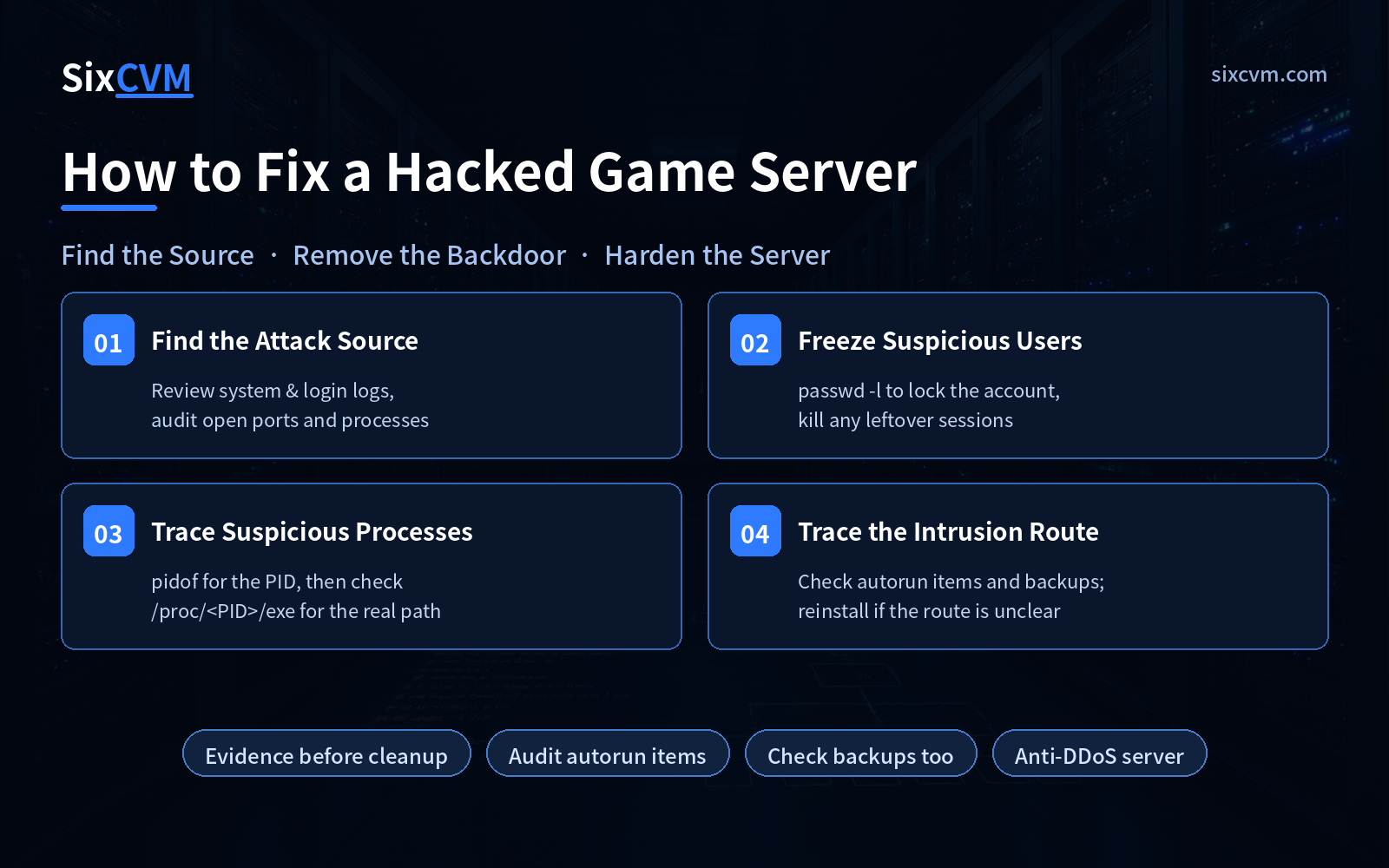
Step 1: Find the attack source — understand what is actually on the system
The starting point is understanding the current state, not rushing to delete things. Many admins see something odd and immediately kill services and delete files — wiping out the very evidence they need, so the entry route can never be reconstructed.
The right move is a first pass of read-only inventory:
-
Logs — Focus on system and login logs (
secure,auth.log,messages,lastlogunder/var/log/). Look for logins at abnormal times, accounts with a sudden spike in failed attempts, and successful logins from unfamiliar IPs. -
Ports — List every listening port with
netstat -tunlporss -tunlp, then account for each one. Which did you open, and which have you never seen before? Unfamiliar high-numbered ports deserve particular suspicion. -
Processes — Cross-check with
ps auxandtop. Flag processes pinned at high CPU for long stretches, and processes whose names look like system services but whose paths look wrong.
The critical part here is professional judgment: the same log line can be a false alarm or a genuine intrusion, and only experience tells them apart. Once a vulnerability is identified, patch it and fix the program bug completely before putting the service back into production — otherwise you are inviting someone into the house before the door is repaired.
Step 2: Freeze suspicious users — and kick lingering sessions offline
For any suspicious account found during investigation, the first action is freeze first, analyze second. Do not investigate and wait — the attacker may be using that account right now.
The classic example: run w to see who is currently logged in. If nobody shows up as a logged-in user, that is almost certainly a problem, because nobody has no login privileges under a default configuration. It is meant to be borrowed by service processes, not to have a human session attached.
# Lock the account
[root@server ~]# passwd -l nobody
Locking only prevents the next login. Sessions already established are not terminated automatically. So after locking, verify whether the user is still online — and if so, kill the session:
# Check which terminal the user is on (pseudo-terminal such as pts/1)
[root@server ~]# w
# Terminate that session
[root@server ~]# pkill -KILL -t pts/1
Apply the same logic to any abnormal account: lock it with passwd -l, confirm whether a session is still alive, kick it if it is, and only then change passwords and review what that account has been doing.
Step 3: Inspect and stop suspicious processes — find the full path first
Process names alone tell you nothing. Intruders name their malware httpd, kworker, or something similarly ordinary. To know what it really is, you have to dig out its complete execution path.
The approach is to follow the chain from PID to file:
# 1. Find the PID of the running process
[root@server ~]# pidof suspicious_process_name

# 2. Enter that process's memory directory
[root@server ~]# cd /proc/

# 3. Inspect the exe symlink — the full path of the executable
[root@server ~]# ls -l exe
With the full path in hand you can trace the malware binary, its directory, and any companion files sitting beside it. Other useful commands for verifying a process include ps, top, and lsof:
# Show the files and network connections the process has open
[root@server ~]# lsof -p
Once you have confirmed a process is malicious, record the information first — path, start time, related files — and only then terminate it and delete the files. Record before you delete. This single step determines whether you can still work out how the intruder got in.
Step 4: Trace the intrusion cause and route — and decide whether to reinstall
Locating the malware means you found the intruder. It does not mean you know how they got in. The causes fall into two categories: system-level vulnerabilities (outdated kernel, SSH, middleware) and application-level vulnerabilities (bugs in the game program itself, third-party plugins, upload endpoints).
You have to establish three things: the cause, the route, and the source. Miss any one and the cleanup will not hold. Knowing the cause lets you patch the hole; knowing the route lets you seal the entrance; knowing the source confirms the removal was complete.
A few things are easy to overlook at this stage:
-
Autorun entries — To survive reboots, malware plants itself in
/etc/init.d/,/etc/rc.local, or crontab. If the server is still being attacked after a restart, these are the first places to check — and compare the modification timestamps of startup files. Anything with an odd timestamp is a lead. -
Backup files — Attackers often contaminate your backups along the way. Always check your backups too. If a backup contains the attack source, delete it immediately — otherwise a single restore brings the malware straight back.
-
Deciding whether to reinstall — If repeated investigation still cannot establish which channel the intrusion came through, the safest choice is to reinstall the operating system and eliminate the source entirely. Running production with an unknown backdoor is a far larger risk than one rebuild.
Quick-reference table: five investigation targets
|
Target |
Root cause |
Fastest effective action |
|---|---|---|
|
Attack source and entry point |
Unpatched vulnerability, entrance left open |
Cross-check logs for abnormal windows + list unfamiliar ports with |
|
Suspicious account |
Weak password or stolen credentials |
Lock with |
|
Suspicious process |
Malware masquerading as a system service |
|
|
Autorun entries |
Malware uses autostart to survive reboots |
Check |
|
Contaminated backups |
Restoring a backup reinstalls the backdoor |
Verify each backup; delete any that are contaminated |
Response order: contain, remove, harden
-
Contain — Lock abnormal accounts, terminate suspicious sessions, isolate the machine if needed. Stop the damage from spreading.
-
Preserve evidence — Record logs, process details, and suspicious file paths completely before you start deleting.
-
Remove — Kill the malicious process → delete the binary → clean autorun entries → inspect and clean backups.
-
Patch — Fix system and application vulnerabilities, replace every weak password, and tighten remote administration access.
-
Harden — Assess whether your current protection is sufficient and decide whether to upgrade it based on your traffic profile.
-
Monitor — Keep watching logs and traffic anomalies for a sustained period after recovery to confirm there is no second intrusion.
Frequently asked questions
Q1: Why is the server still being attacked after a reboot?Almost certainly because the malware configured itself to start automatically. Focus on /etc/init.d/, /etc/rc.local, /etc/crontab, and per-user crontabs, comparing modification timestamps to spot planted startup entries.
Q2: How do I tell a pure traffic attack from an actual system compromise?The symptoms differ. A traffic attack shows saturated bandwidth and connection counts while processes, files, and accounts all remain clean, and the service recovers on its own once the attack stops. A compromise shows abnormal processes, files, and accounts — unfamiliar listening ports, modified system files, extra accounts. The first is handled by traffic scrubbing; the second requires the full cleanup flow.
Q3: Can a backup really contain malware?Yes. Intruders typically stay dormant for a while after getting in, and backups taken during that window carry the backdoor. Always inspect backup contents before restoring — otherwise you are reinstalling the malware on purpose.
Q4: Why do I need an anti-DDoS server for a game business?Traffic-based attacks dominate in gaming: sudden onset, long duration, extremely high peaks. Games are also extremely latency-sensitive, so once bandwidth is saturated, players experience it as a straight disconnect. An anti-DDoS server scrubs large attacks before they reach your workload machines and provides extra bandwidth headroom so legitimate players are unaffected. For a game business this is not optional — it is core infrastructure for business continuity.
About SixCVM
SixCVM is a global cloud server provider focused on cross-border workloads, delivering stable compute and network capacity for latency-sensitive use cases such as gaming, live streaming, and cross-border e-commerce. We operate seven core nodes — Hong Kong, Japan, the United States, Korea, Singapore, Taiwan, and Vietnam — connected through CN2 GIA / BGP optimized routes, with Hong Kong latency as low as under 10ms. That gives game businesses serving Asia-Pacific players a stable, low-latency connection.
Our product line covers cloud VPS, GPU servers (NVIDIA A100 / H100 / RTX series), dedicated servers, bare metal servers, and domain registration. Every node runs NVMe SSD storage, supports minute-level deployment and elastic scaling, and offers snapshot backups and load balancing. All nodes come with a 99.9% SLA and 24/7 technical support. On the security side, we provide baseline network-layer protection, system hardening guidance, and fast rollback capability — so when an attack lands, you can contain it immediately and recover quickly.
This article is general server operations and security education. Perform any investigation steps only with proper authorization, and only on servers you legally administer.